POS · Inventory · Invoicing

The register that keeps your pace — even offline.

Ring up sales in a few taps, track stock shelf by shelf, invoice and reward your regulars. On tablet, phone, PC or browser, in your language and your currency.

3 months free, no credit card

Demo login: admin@demo.com / admin

  • Sales keep recording during an outage
  • Ready in minutes, no hardware lock-in
  • Support in French
Offline: selling continues
Synced
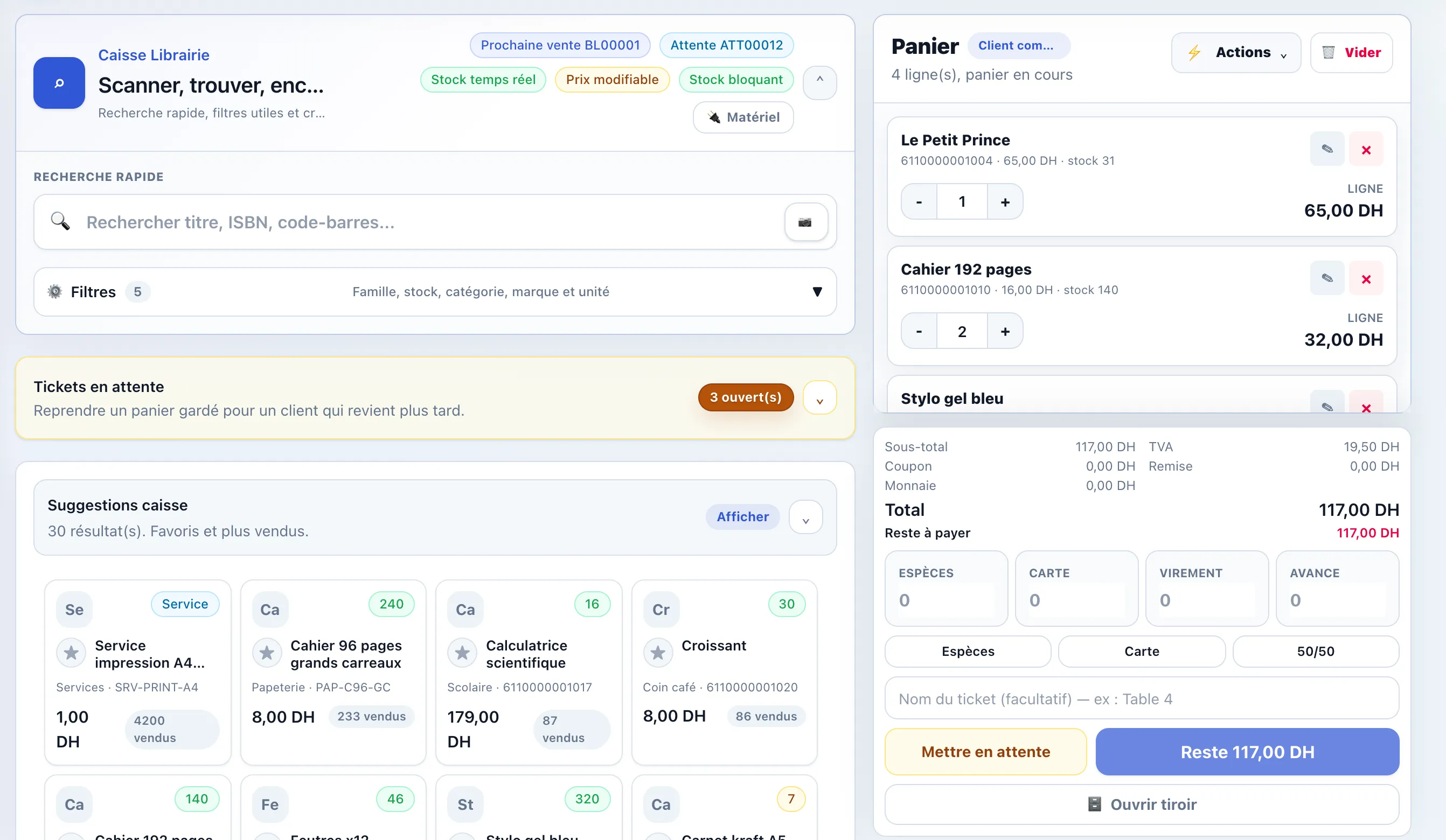
Castl-it-POS register: products, current cart and payment
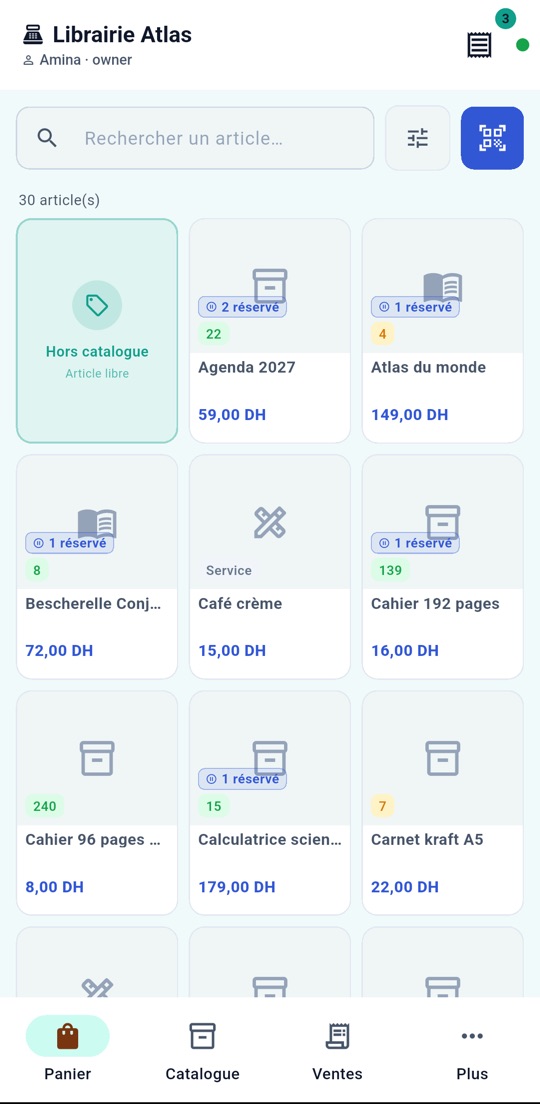
Castl-it-POS mobile app: register catalogue on a phone
0sales lost when the internet drops
25+modules included, from register to reports
12trades set up out of the box
7languages in the app
Your whole shop, one app

From the counter to the monthly report

Castl-it-POS brings together the register, stock, purchasing, invoicing, loyalty and reporting. Turn on only the modules you need.

A fast register built for the counter

Scan or tap, take payment, print or send the receipt. Your cashiers learn it in minutes.

  • Barcode scanning, instant search and favourite items
  • Cash, card, transfer, customer credit or split payment
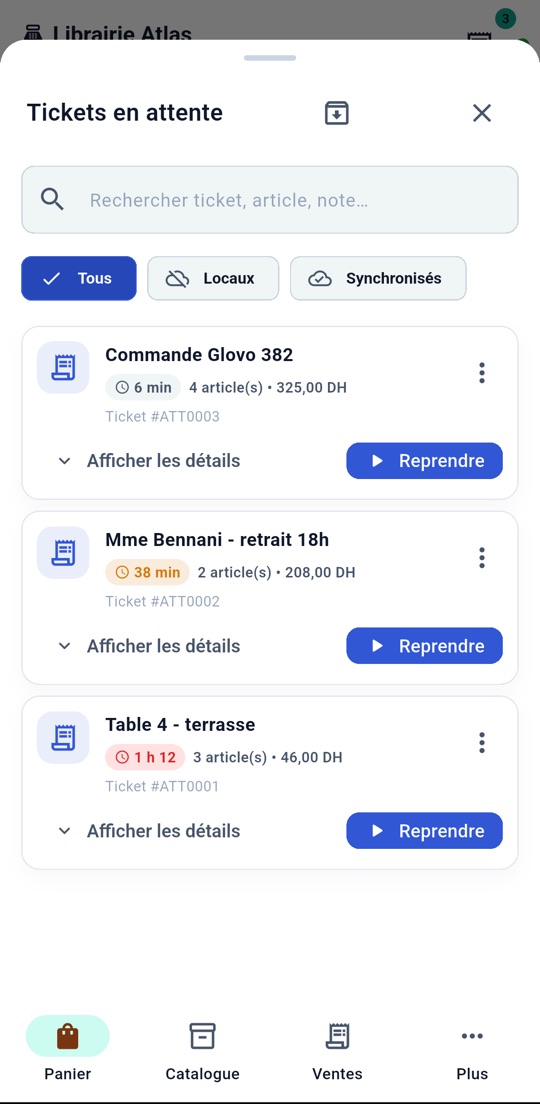
  • Named open tickets (“Table 4”) with a timer
  • Discounts, coupons, price edits by permission
  • Returns, credit notes and receipts sent by WhatsApp
  • Cash drawer opening and closing, differences explained
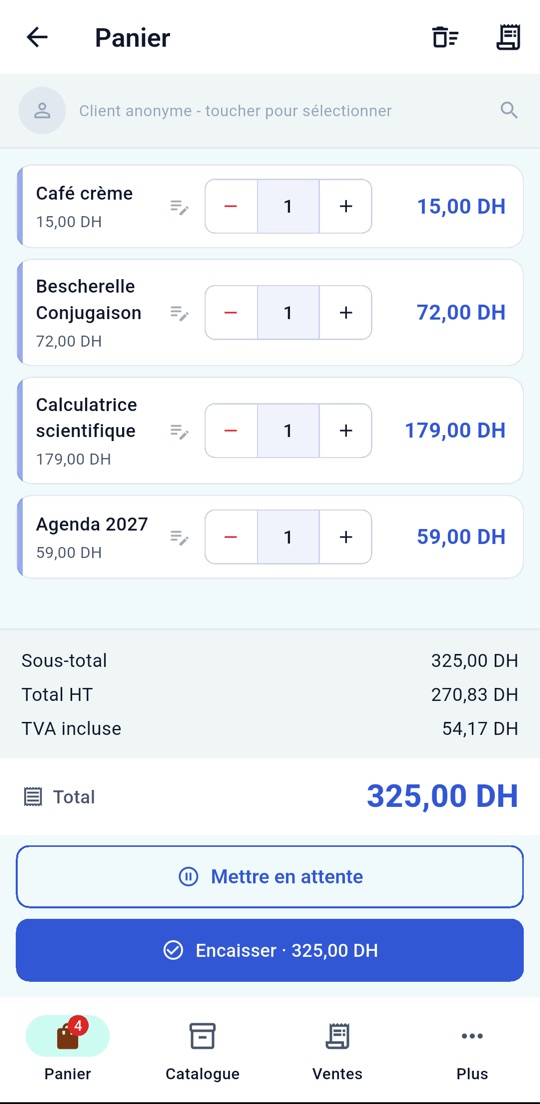
Register with a cart: books, stationery and coffee

Accurate stock, shelf by shelf

Every sale, purchase or transfer updates stock. Alerts warn you before you run out.

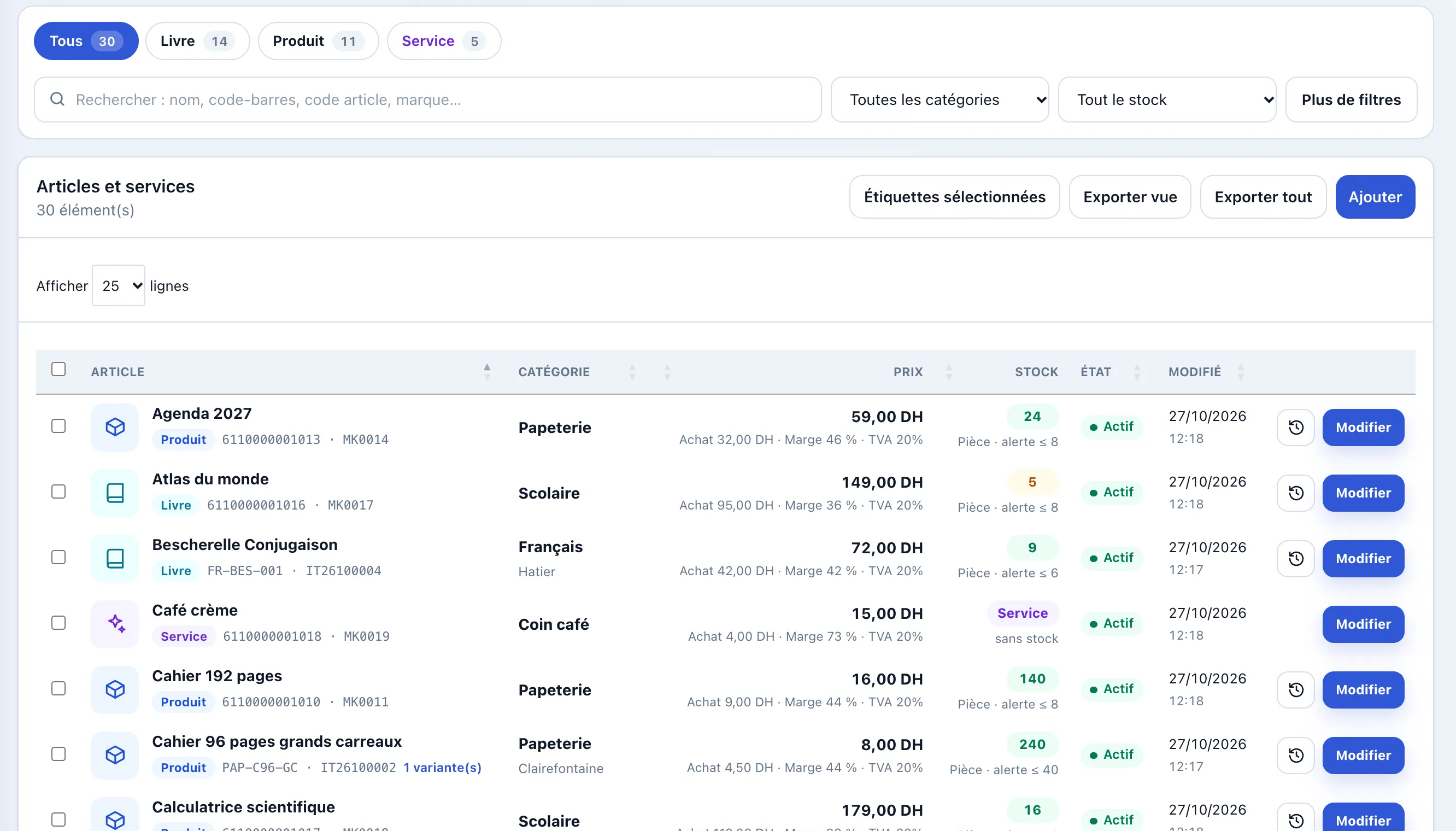
  • Products, services and bundles in one list
  • Variants (size, colour) with their own stock, options and add-ons
  • Excel import and bulk photos (ZIP), barcode labels
  • Several stores and warehouses, transfers and stock counts
  • Supplier orders, receiving and purchase returns
  • Average-cost valuation and alert thresholds
Catalogue: products, categories, price, margin and stock

Quotes, invoices and deliveries without retyping

Turn a quote into an invoice, track due dates and follow up at the right time.

  • Quotes, pro-formas, invoices and credit notes as PDFs with your logo
  • Configurable legal mentions (VAT, tax IDs), net or gross
  • Delivery notes and preparation tracking
  • Due dates, overdue items and receivables at a glance
  • Online shop: pre-orders and reservations
  • Send by email, SMS or WhatsApp
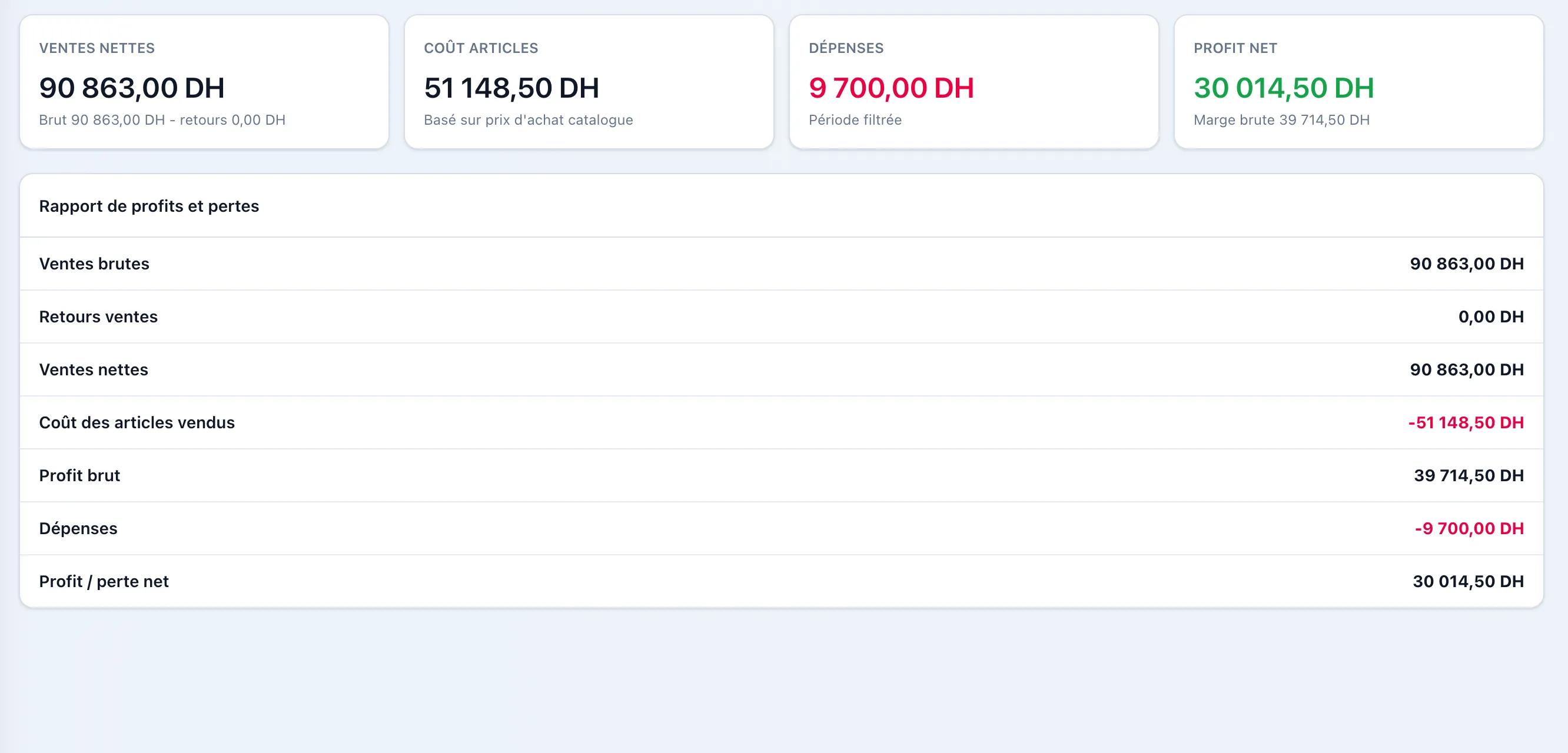
Profit and loss report for the period

Customers who come back

Find a customer by name or phone, reward their loyalty, manage their credit.

  • Customer and supplier records, purchase history
  • Loyalty points earned and redeemed at the register
  • Deposits, advances and customer credit with a limit
  • Coupons and discount rules by customer or payment
  • Phone numbers in international format, WhatsApp-ready
  • Loans and membership cards for libraries
Cart in the mobile app

Your numbers, without a spreadsheet

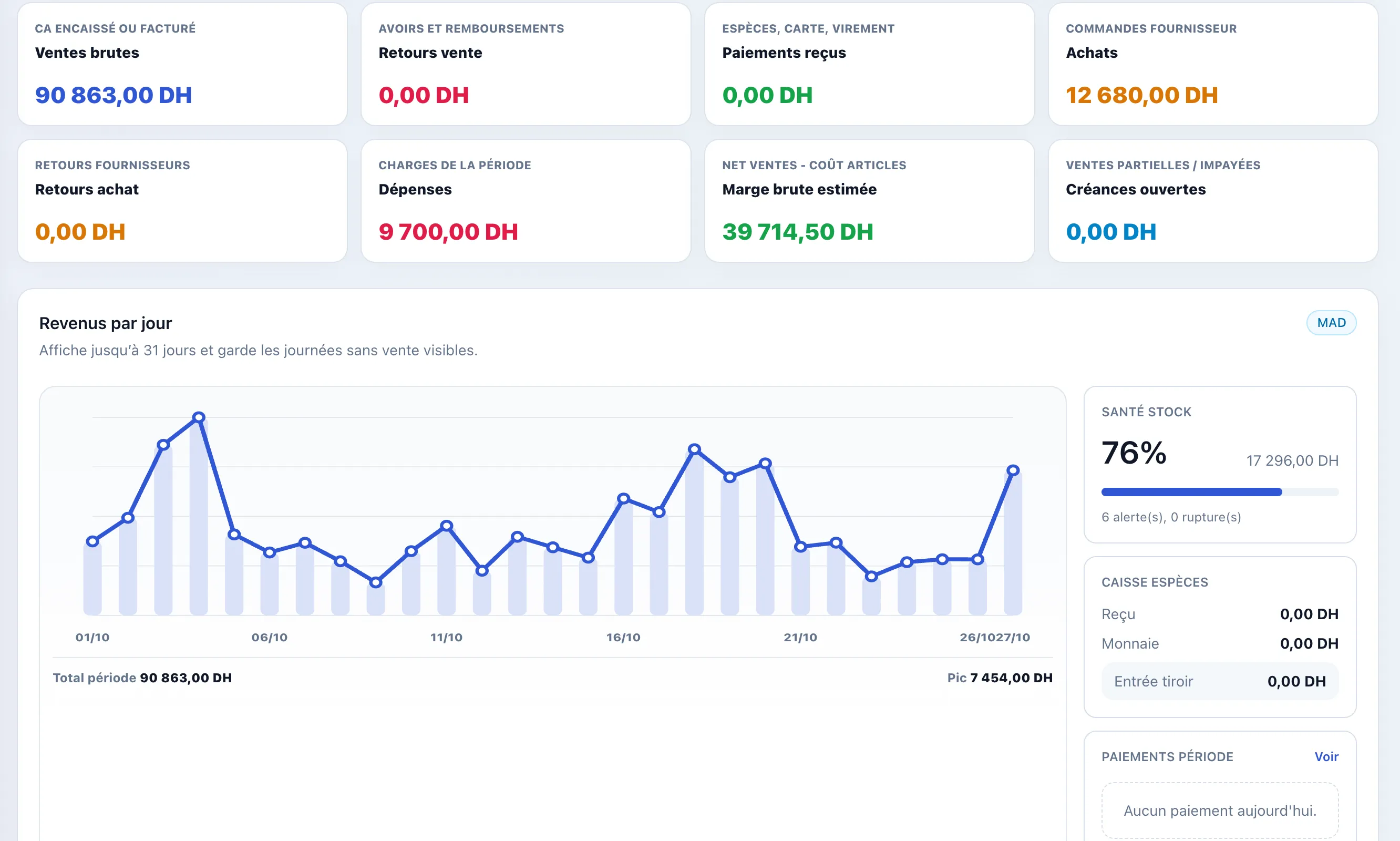
Revenue, margins, peak hours and stock: all calculated for you, per store and per period.

  • Dashboard for the day, week or month
  • Sales, purchasing, stock, expense and finance reports
  • Bank and cash accounts, deposits and transfers
  • Users, roles, permissions and a PIN per cashier
  • Several registers and devices, activity log
  • Your logo, your colours and your currency everywhere
Dashboard: key figures and revenue per day
Named open tickets with how long they have been open
Cafés & restaurants

Table service without paper or mix-ups

Name every table or order, send it to the kitchen and see at a glance what has been waiting too long.

Named tickets with a timer

“Table 4 – terrace”, “Glovo 382”: each ticket keeps its name and the time elapsed, amber after 30 min, red after an hour.

Kitchen display (KDS)

Dishes go to the kitchen or the bar, per station, and move from “preparing” to “ready”.

Options and add-ons

No onions, sauce on the side, extra cheese: modifiers follow the order all the way to the receipt.

Several registers, one service

The restaurant’s tablets share tickets over the local Wi-Fi, even when the internet is down.

Reliability

Internet down? Your register isn’t.

Castl-it-POS records every sale on the device, then syncs as soon as the network is back. Your tablets keep talking to each other over the shop’s Wi-Fi.

  1. You sell

    The sale is saved on the device, receipt printed, stock deducted.

  2. The shop stays in sync

    Other registers see open tickets over the local network.

  3. Everything goes online

    When the internet returns, sales and stock reach your account, with no duplicates.

Devices & hardware

Use the hardware you already have

An Android phone is enough to start. Add a printer or a scanner whenever you like.

Android

Tablets and phones, full screen.

Windows & browser

On PC, Mac or any recent browser.

PAX terminals

Built-in receipt printer.

Receipt printer

ESC/POS over the network (Wi-Fi or cable).

Scanner & camera

Barcode and ISBN scanning.

Customer display

A second screen facing the customer.

Mobile app

Your register in your pocket, on Android

Install Castl-it-POS on a tablet or phone for a full-screen experience without a browser — and find the same data on your computer.

Scan with your phone to install the app.castlitpos.com/telecharger

  • Works offline, syncs automatically
  • ESC/POS receipt printing & barcode scanning
  • Multiple operators, PIN lock
Castl-it-POS mobile app: register catalogue on a phone
Built for your trade

Ready for your business from day one

Pick your trade when you sign up: catalogue, units, labels and modules are set up for you.

Bookshops & stationers

ISBN, school supplies, loans.

Cafés & coffee shops

Fast counter, options, loyalty.

Restaurants

Tables, kitchen, add-ons.

Bakeries & pastry shops

Orders, daily products, counter.

Grocery & convenience

Fast scanning, high volumes.

Clothing & fashion

Sizes and colours as variants.

Beauty, spa & salons

Services, packages and clients.

Cosmetics & perfume

Brands, gift sets, loyalty.

Pharmacies & parapharmacy

References, thresholds, suppliers.

Hardware stores

Large catalogue, many units.

Phones & electronics

References, warranties, accessories.

Any other shop

A simple base you adapt.

Get started

Your register online in three steps

  1. You sign up

    Two minutes: shop name, trade, currency and your space’s address.

  2. We create your space

    Approved by our team, it goes live on your own .castlitpos.com address.

  3. You sell

    Import your catalogue from Excel, install the app and start selling.

Free trial

3 months to try it for real

Every feature, your real sales, no commitment and no credit card. Our team answers every question you have.

  • All modules included during the trial
  • Import your Excel catalogue and your photos
  • Android app, PC and browser
  • Your data stays yours, exportable at any time
Start the free trial

Several stores or a specific need?

Write to us: we’ll offer a price that fits your business.

Ask for a price
FAQ

Everything you need to know

Does Castl-it-POS work without an internet connection?

Yes. Every sale is saved on the device and synced as soon as the network is back. Registers in the same shop can also share tickets over the local Wi-Fi, without internet.

How much does Castl-it-POS cost?

You start with a 3-month free trial, no credit card. After that, we offer a price based on your number of stores and registers: just write to us.

Which devices can I use?

Android tablets and phones, Windows PCs and any browser. PAX terminals with a built-in printer are supported. Your data is the same on every device.

Can I import my existing catalogue?

Yes: import products and services from an Excel file, and your photos in bulk from a ZIP folder, matched by file name or barcode.

Is it suitable for cafés and restaurants?

Yes: tickets named by table with a timer, a kitchen display (KDS), options and add-ons, and several registers sharing orders on the floor.

Can I manage several stores?

Yes. Several stores and warehouses, each with its own stock, transfers between them and reports per store or combined.

Are my invoices compliant?

Invoices, quotes and credit notes carry your logo and your country’s legal mentions (VAT, tax IDs), net or gross, in your currency.

Which languages and currencies?

The app comes in 7 languages including French, Arabic and English. Each shop picks its currency: dirham, euro, dollar, CFA franc, dinar…

Is my data safe?

Each business has its own space, per-user access with roles and PIN codes, and can export its data at any time.

How do I get started?

Fill in the form below. Once approved, your space is created on its own address and you receive your login by email.